Yii is a powerful PHP framework used to build websites, web applications, APIs, and custom business systems. Like any software framework, Yii applications require regular security reviews and maintenance to remain reliable.
Outdated framework components, vulnerable dependencies, insecure code, and incorrect server configurations can introduce security weaknesses over time.
The good news is that identifying a Yii security vulnerability does not automatically mean rebuilding your application. Many issues can be addressed through targeted code improvements, dependency updates, and proper security testing.
This guide explains how to identify and fix common Yii framework security vulnerabilities while keeping your existing application stable.
Contents
hide
What Are Yii Framework Security Vulnerabilities?
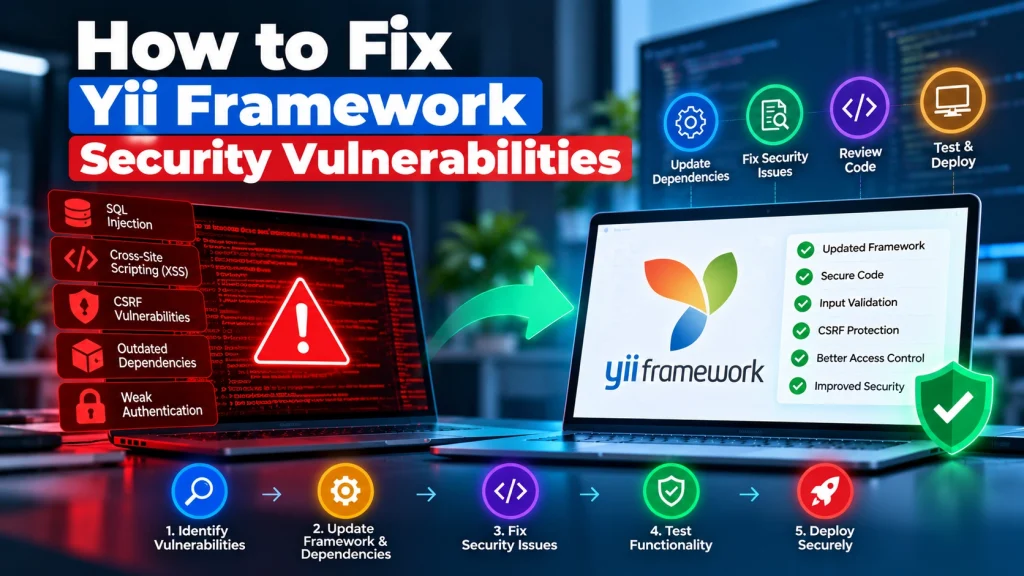
Yii framework security vulnerabilities are weaknesses in the framework, its dependencies, application code, or server configuration that could potentially be exploited. Common security concerns include:- SQL injection
- Cross-site scripting (XSS)
- Cross-site request forgery (CSRF)
- Outdated Yii components
- Vulnerable Composer dependencies
- Weak authentication and access controls
- Insecure file handling
- Exposed configuration files
- Improper error handling
1. Check Your Yii Framework Version
Start by identifying which Yii version your application uses. Yii applications commonly use Yii 1.1, Yii 2, or Yii 3. Each has its own release and maintenance lifecycle. For example, Yii 2.0.55 was released in May 2026 and included a security fix for CVE-2026-39850. This demonstrates why keeping track of framework releases and security advisories is important. Review your framework version, PHP requirements, and official security announcements before planning an update.2. Update Yii and Composer Dependencies
Outdated framework components and third-party packages can introduce known security weaknesses. Review your application’s Composer configuration and identify dependencies that require security updates. A controlled update process should include:- Checking installed package versions
- Reviewing security advisories
- Identifying vulnerable dependencies
- Updating compatible packages
- Reviewing breaking changes
- Running application tests
3. Prevent SQL Injection
SQL injection occurs when untrusted user input is inserted directly into database queries. For example, an application that builds SQL statements by concatenating user-provided values may allow attackers to manipulate database queries. Yii provides database tools and Active Record functionality that support parameterized queries. Developers should:- Use parameterized queries.
- Avoid directly concatenating user input into SQL.
- Validate incoming data.
- Restrict dynamic table and column names to approved values.
- Review raw SQL queries carefully.
4. Protect Against Cross-Site Scripting (XSS)
Cross-site scripting occurs when an application displays untrusted content without properly escaping it. For example, a user may submit malicious JavaScript through a form or profile field. If the application displays that content without appropriate escaping, the browser may execute it. Yii provides helpers such asHtml::encode() for escaping plain text in HTML output.
For content that intentionally allows HTML, use an appropriate sanitization approach rather than displaying untrusted markup directly.
Input validation and output escaping should both be part of your security strategy.
5. Enable CSRF Protection
Cross-site request forgery can cause an authenticated user’s browser to perform unwanted actions on a website. Yii provides built-in CSRF protection for web applications. Developers should:- Keep CSRF validation enabled where applicable.
- Include CSRF tokens in protected forms.
- Handle AJAX requests correctly.
- Avoid using GET requests for actions that change application data.
- Review any intentional CSRF exceptions carefully.
6. Strengthen Authentication and Access Control
A secure login system should also control what users can access after authentication. Review user roles, permissions, administrative routes, API endpoints, and sensitive application operations. Make sure users cannot access restricted information simply by changing a URL, request parameter, or record ID. Use appropriate authorization checks for sensitive actions and apply secure password-handling practices.7. Secure Configuration and Server Settings
Application configuration can expose sensitive information if it is not handled properly. Review:- Database credentials
- API keys
- Environment variables
- Session configuration
- File permissions
- Error reporting
- Debug settings
- HTTPS configuration
8. Test Security Fixes Before Deployment
Applying a security update is only part of the process. You also need to confirm that the application continues working correctly. Whenever possible, test changes in a staging environment before deploying them to production. Check important functionality, including:- Login and registration
- Forms and validation
- Database operations
- User permissions
- Admin dashboards
- APIs and integrations
- File uploads
- Payment functionality
- Error logs